Adding Links / Linking PDF
Sometimes you might need to link your content to other websites or even to other pages on your website.
Adding a Normal Link
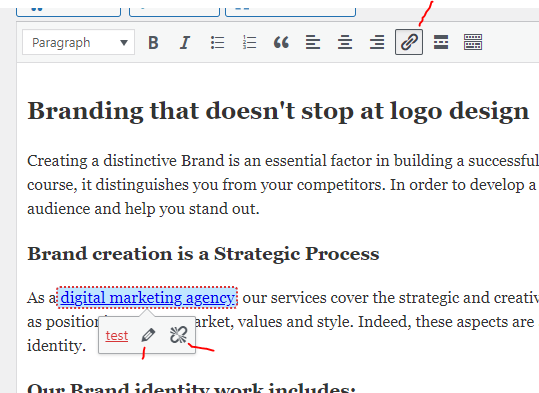
To do this edit your page, and find the text you wish to add a link to. Highlight the text and click on the paper clip icon just above the text box. This will bring up a box where you can type in the URL of the link or you can click the gear for more options this will let you link to internal content easily or even make your link open in a new window.
To remove a link just highlight it and click the broken paperclip icon.
Adding a PDF link
To add a pdf link on a page all you need to do is upload the pdf to the media library and then follow above, instead of putting a link to another page you can link to the pdf.